Posts
Planets: Jupiter

A look at some interesting facts of Jupiter: Jupiter and Spacecraft Juno, Artist Image Jupiter is the largest planet of our solar system, so big that it can fit more than 1300 Earths inside it. Thick colorful clouds of deadly poisonous gases surround Jupiter. The quick spinning of the planet whips up the atmosphere, creating bands around the planet. If you were to descend into Jupiter, thin cold atmosphere becomes thicker and hotter, gradually turning into a thick dark fog. In the blackness about 1000 Km down the pressure squeezes the atmosphere so hard that it turns into liquid. Center of Jupiter is made up of rocky core, slightly bigger than Earth but weighing about 20 times more than weight of Earth. Surrounding the core is ocean of liquid hydrogen, about 1000 Km deep. Jupiter has many storms, some can be seen from Earth via telescope. The big red spot of Jupiter is the largest hurricane in our solar system. It's been ranging for 3 hundred year...
Popular posts from this blog
VLSI: 1-4 DEMUX (Demultiplexer) Dataflow Modelling with Testbench

Verilog Code for 1-4 DEMUX Dataflow Modelling module demux_1_to_4( input d, input s0, input s1, output y0, output y1, output y2, output y3 ); assign s1n = ~ s1; assign s0n = ~ s0; assign y0 = d& s0n & s1n; assign y1 = d & s0 & s1n; assign y2 = d & s0n & s1; assign y3 = d & s0 & s1; endmodule //Testbench code for 1-4 DEMUX Dataflow Modelling initial begin // Initialize Inputs ...
VLSI: 4-1 MUX Dataflow Modelling with Testbench
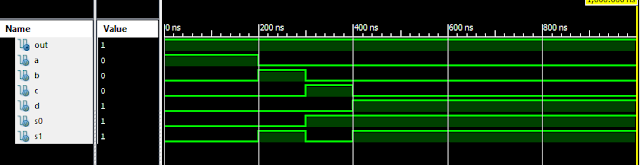
Verilog Code for 4-1 MUX Dataflow Modelling module m41(out, i0, i1, i2, i3, s0, s1); output out; input i0, i1, i2, i3, s0, s1; assign y0 = (i0 & (~s0) & (~s1)); assign y1 = (i1 & (~s0) & s1); assign y2 = (i2 & s0 & (~s1)); assign y3 = (i3 & s0 & s1); assign out = (y0 | y1 | y2 | y3); endmodule //Testbench code for 4-1 MUX Dataflow Modelling initial begin // Initialize Inputs a = 1;b = 0;c = 0;d = 0;s0 = 0;s1 = 0; ...
Verilog: 4 Bit Counter Behavioral Modelling using If Else Statement

Verilog Code for 4 Bit Counter Behavioral Modelling using If Else Statement module 4_bit_Count( input clock, reset, output [3:0]dout ); reg [3:0]dout; initial dout = 0; always @ (posedge (clock)) begin if (reset) dout <= 0; else dout <= dout + 1; end endmodule Xillinx Output: 4 Bit Counter Behavioral Modelling Response Also See: List of Verilog Programs
Samir Palnitkar Solution Manual Free Download PDF of Verilog HDL

This is a solution guide to the exercises of the book "The Solution Manual of the Verilog HDL: A Guide to Digital Design and Synthesis by Samir Palnitkar". Following are the Solutions to Solution Manual on Verilog HDL: A Guide to Digital Design and Synthesis by Samir Palnitkar , exercises of all chapters in the book. Chapter 1 ----------------- No Exercises ---------------- Chapter 2 : Hierarchical Modeling Concepts Chapter 3 : Basic Concepts Chapter 4 : Modules and Ports Chapter 5: Gate-level Modeling Chapter 6 : Dataflow Modeling Chapter 7 : Behavioral Modeling Chapter 8 : Tasks and Functions Download Solution Manual: Click on this link (Mega.nz Link) [Solution Manual to Verilog HDL: A Guide to Digital Design and Synthesis by Samir Palnitkar] Preview of Solution Manual: For Verilog Programs: Go to Index of Verilog Programming Tags: Verilog HDL solutio...
Verilog: 4 to 1 Multiplexer Behavioral Modelling with Testbench Code
Verilog Code 4-1 Multiplexer Behavioral Modelling using Case Statement module Mux_4to1 ( input [3:0] i, input s1, s0, output out ); always @(i or s1 or s0) case({s1, s0}) 0 : out = i[0]; 1 : out = i[1]; 2 : out = i[2]; 3 : out = i[3]; default : out = 1’bx; endcase endmodule // test-bench initial begin i=1'b1010; s1=0; s0=0; #100; //wait 100ns for global reset to finish //add stimulus here #100 s1 = 0; s0= 1; #100 s1 = 1; s0= 0; #100 s1 = 1; s0= 1; end