Optimization: Interval Halving Method
1. Interval Halving Method Algorithm in C
#include<stdio.h>
double myFun(double x);
int main()
{
double a, b, y, x, xm, x1, x2, fx1, fx2, fxm, L, t=0.01;
printf("Enter a:");
scanf("%lf",&a); //Upper Bound
printf("Enter b:");
scanf("%lf",&b); //Lower Bound
xm = (a + b)/2;
jump:
L = b-a;
x1 = a + (L/4);
x2 = b - (L/4);
printf("\n\na = %.2lf",a);
printf("\nb = %.2lf",b);
printf("\nx1 = %.2lf",x1);
printf("\nx2 = %.2lf",x2);
printf("\nxm = %.2lf",xm);
printf("\nL = %.2lf",L);
fx1 = myFun(x1);
printf("\nf(x1) = %.2lf",fx1);
fx2 = myFun(x2);
printf("\nf(x2) = %.2lf",fx2);
fxm = myFun(xm);
printf("\nf(xm) = %.2lf",fxm);
if(L > t)
{
if (fx1 < fxm)
{
a = a;
b = xm;
xm = x1;
goto jump;
}
else if (fx2 < fxm)
{
b = b;
a = xm;
xm = x2;
goto jump;
}
else if (fx1 > fxm && fx2 > fxm)
{
a = x1;
b = x2;
xm = (a+b)/2;
goto jump;
}
else
{
goto end;
}
}
else
{
goto end;
}
end:
return 0;
}
double myFun(double x) // function definition
{
double y;
y = ((x*x)+(54/x));
return y; // return statement
}
double myFun(double x);
int main()
{
double a, b, y, x, xm, x1, x2, fx1, fx2, fxm, L, t=0.01;
printf("Enter a:");
scanf("%lf",&a); //Upper Bound
printf("Enter b:");
scanf("%lf",&b); //Lower Bound
xm = (a + b)/2;
jump:
L = b-a;
x1 = a + (L/4);
x2 = b - (L/4);
printf("\n\na = %.2lf",a);
printf("\nb = %.2lf",b);
printf("\nx1 = %.2lf",x1);
printf("\nx2 = %.2lf",x2);
printf("\nxm = %.2lf",xm);
printf("\nL = %.2lf",L);
fx1 = myFun(x1);
printf("\nf(x1) = %.2lf",fx1);
fx2 = myFun(x2);
printf("\nf(x2) = %.2lf",fx2);
fxm = myFun(xm);
printf("\nf(xm) = %.2lf",fxm);
if(L > t)
{
if (fx1 < fxm)
{
a = a;
b = xm;
xm = x1;
goto jump;
}
else if (fx2 < fxm)
{
b = b;
a = xm;
xm = x2;
goto jump;
}
else if (fx1 > fxm && fx2 > fxm)
{
a = x1;
b = x2;
xm = (a+b)/2;
goto jump;
}
else
{
goto end;
}
}
else
{
goto end;
}
end:
return 0;
}
double myFun(double x) // function definition
{
double y;
y = ((x*x)+(54/x));
return y; // return statement
}
Output:
 |
| Interval Halving Method Optimization Algorithm |

Comments
Popular posts from this blog
Samir Palnitkar Solution Manual Free Download PDF of Verilog HDL

This is a solution guide to the exercises of the book "The Solution Manual of the Verilog HDL: A Guide to Digital Design and Synthesis by Samir Palnitkar". Following are the Solutions to Solution Manual on Verilog HDL: A Guide to Digital Design and Synthesis by Samir Palnitkar , exercises of all chapters in the book. Chapter 1 ----------------- No Exercises ---------------- Chapter 2 : Hierarchical Modeling Concepts Chapter 3 : Basic Concepts Chapter 4 : Modules and Ports Chapter 5: Gate-level Modeling Chapter 6 : Dataflow Modeling Chapter 7 : Behavioral Modeling Chapter 8 : Tasks and Functions Download Solution Manual: Click on this link (Mega.nz Link) [Solution Manual to Verilog HDL: A Guide to Digital Design and Synthesis by Samir Palnitkar] Preview of Solution Manual: For Verilog Programs: Go to Index of Verilog Programming Tags: Verilog HDL solutio...
Verilog: 4 Bit Full Adder Behavioral Modelling with Testbench Code
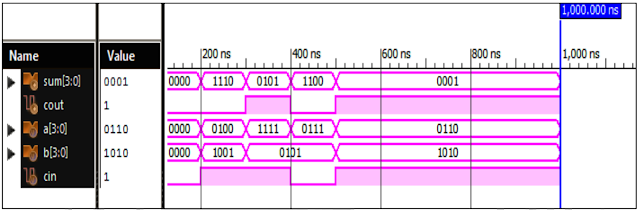
Verilog Code for 4 Bit Full Adder Behavioral Modelling with Testbench Code module 4_bit_Add( input [3:0]a,b, input cin, output [3:0]sum, output cout ); reg [3:0]sum; reg cout; always @ (a or b or cin) assign {cout,sum}= a + b + cin; endmodule //Testbench code for 4 Bit Full Adder Behavioral Modelling initial begin // Initialize Inputs a = 0; b = 0; cin = 0; // Wait 100 ns for global reset to finish #100; // Add stimulus here #100 a=4; b=9; cin=1; #100 a=15; b=5; cin=1; #100 a=7; b=5; cin=0; #100 a=6; b=10; cin=1; end initial begin #100 $monitor (“ a = %b, b = %b, cin = %b, sum = %b, cout = %b”, a, b, cin, sum, cout); end endmodule Xillinx Output: 4 Bit Full Adder Behavioral Modelling Response Also See: List of Verilog Programs
VLSI: 4-1 MUX Dataflow Modelling with Testbench
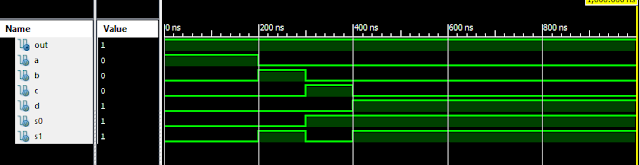
Verilog Code for 4-1 MUX Dataflow Modelling module m41(out, i0, i1, i2, i3, s0, s1); output out; input i0, i1, i2, i3, s0, s1; assign y0 = (i0 & (~s0) & (~s1)); assign y1 = (i1 & (~s0) & s1); assign y2 = (i2 & s0 & (~s1)); assign y3 = (i3 & s0 & s1); assign out = (y0 | y1 | y2 | y3); endmodule //Testbench code for 4-1 MUX Dataflow Modelling initial begin // Initialize Inputs a = 1;b = 0;c = 0;d = 0;s0 = 0;s1 = 0; ...
Verilog: 4 Bit Counter Behavioral Modelling using If Else Statement

Verilog Code for 4 Bit Counter Behavioral Modelling using If Else Statement module 4_bit_Count( input clock, reset, output [3:0]dout ); reg [3:0]dout; initial dout = 0; always @ (posedge (clock)) begin if (reset) dout <= 0; else dout <= dout + 1; end endmodule Xillinx Output: 4 Bit Counter Behavioral Modelling Response Also See: List of Verilog Programs
Verilog: 1to 8 DeMultiplexer (1-8 DEMUX) Dataflow Modelling with Testbench Code
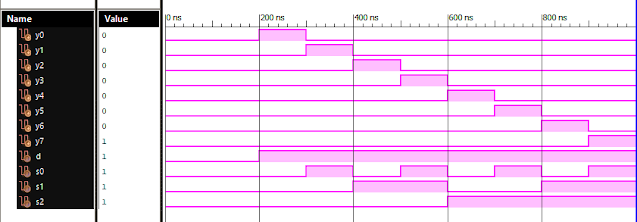
Verilog Code for 1 to 8 DeMultiplexer Dataflow Modelling module demux_1_to_8( input d, input s0, input s1, input s2, output y0, output y1, output y2, output y3, output y4, output y5, output y6, output y7 ); assign s0n = ~ s0; assign s1n = ~ s1; assign s2n = ~ s2; assign y0 = d & s0n & s1n & s2n; assign y1 = d & s0 & s1n & s2n; assign y2 = d & s0n & s1 & s2n; assign y3 = d & s0 & s1 & s2n; assign y4 = d & s0n & s1n & s2; assign y5 = d & s0 & s1n & s2; assign y6 = d & s0n & s1 & s2; assign y7 = d & s0 & s1 & s2; endmodule //Testbench code for 1-8 DEMUX Dataflow Modelling initial begin // Initialize Inputs d = 0;s0 = 0;s1 = 0;s2 = 0; // Wait 100 ns for global reset to finish #100; // Add stimulus here #100; d = 1;s0 = 0;s1 = 0;s2 = 0; #100; d = 1;s0 = 1;s1 = 0;s2 = 0; #100; d = 1;s0 = 0;s1 = 1;s2 = 0; #100; d = 1;s0 = 1;s1 = 1;s2 = 0; #100; d = 1;s0 = 0;s1 = 0;s2 = 1; ...
Best Python Training in Pune with Placement
ReplyDeletePython Course in Pune
Python Certification Course in Pune
Python Programming Training in Pune
Advanced Python Classes in Pune